
Your production engineers found a rod pump simulator they want to use. Now it lands on your desk. You need to know how it fits into your identity stack, what access controls exist, and whether it will pass your next SOC 2 or internal compliance audit.
This article covers the specifics. No marketing language, just the technical details your team needs to evaluate PetroBench against your enterprise security requirements.
Single sign-on
PetroBench supports SAML 2.0 for enterprise SSO. If your organization uses Azure Active Directory, Okta, or any SAML 2.0-compliant identity provider, your users authenticate through your existing IdP. No separate credentials to manage.
How it works
Your IdP admin configures PetroBench as a service provider in your identity dashboard. PetroBench accepts the SAML assertion, maps the user to your organization, and assigns them a default role. The entire flow uses your existing MFA policies - we do not bypass or replace them.
Supported identity providers:
- Azure Active Directory - SAML 2.0 with attribute mapping for role and organization
- Okta - Pre-built SAML integration, available in the Okta Integration Network
- Any SAML 2.0 IdP - OneLogin, PingFederate, Google Workspace, or custom SAML providers
Session management follows your IdP policies. When a user is deactivated in your directory, their PetroBench session ends at the next token refresh. No orphaned accounts.
Role-based access control
PetroBench uses a four-role model designed around how oil and gas teams actually work. Each role has a fixed permission set - no ambiguous custom permission trees to maintain.
The four roles
- Admin - Full platform access. Manages users, roles, organization settings, billing, and integrations. Can view and export audit logs. Typically assigned to IT administrators or engineering managers.
- Engineer - Creates and runs simulations, manages well data, generates reports. Cannot modify user accounts or organization settings.
- Advisor - Read and write access to simulations and wells within their assigned divisions. Designed for third-party consultants or field advisors who need to contribute without seeing the full organizational dataset.
- Reviewer - Read-only access. Can view simulations, results, and reports but cannot create or modify data. Useful for management review or regulatory inspections.
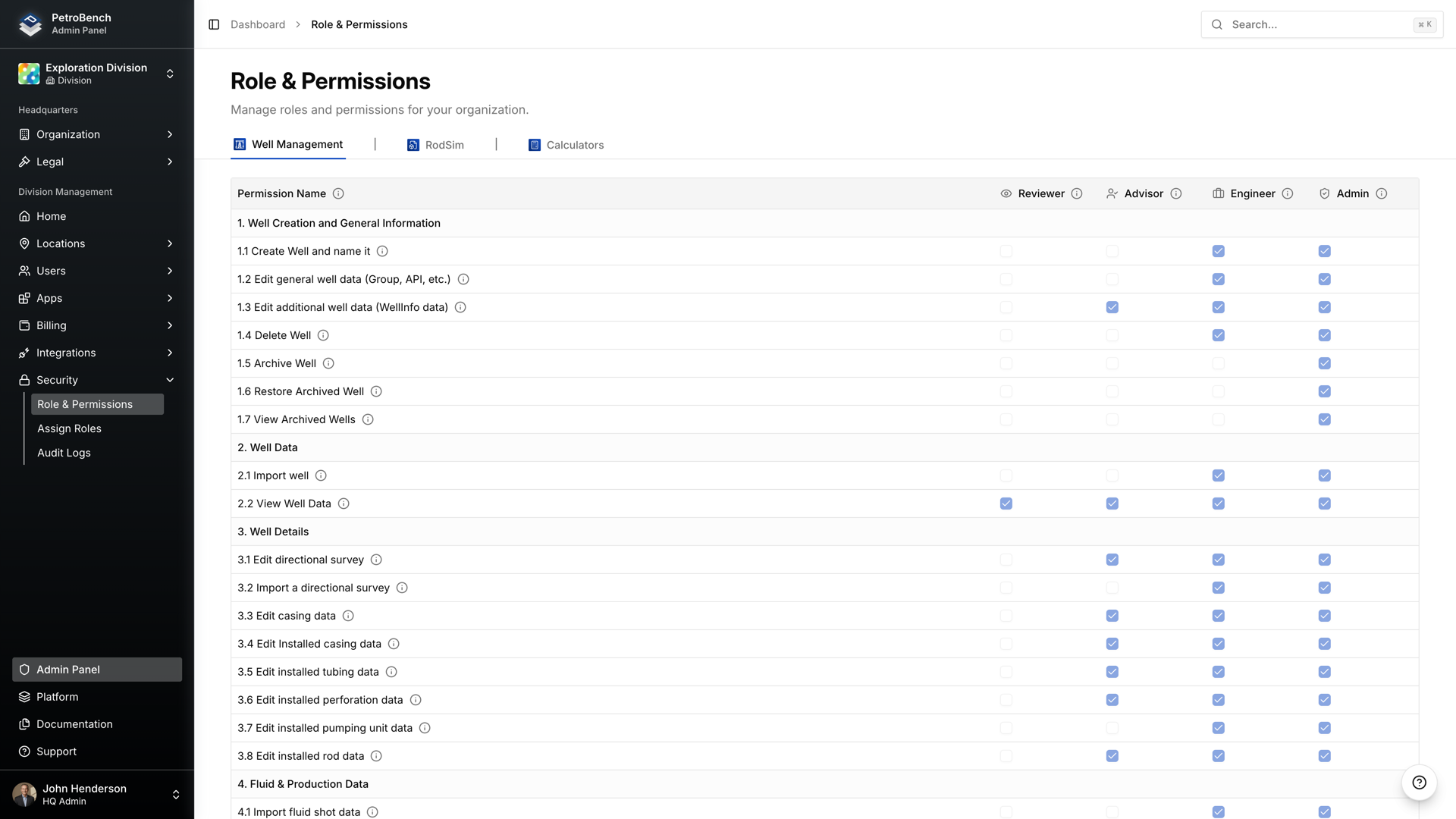
Roles are assigned per user at the organization level. A user's role determines what they can do across every application in the platform - RodSim, well management, calculators, and reporting.
Organization hierarchy and scoped permissions
PetroBench structures data around a three-level hierarchy: Organization, Division, and Region. This maps to how most operators and service companies already organize their operations.
- Organization - The top-level tenant. All users, wells, and simulations belong to an organization. SSO is configured at this level.
- Division - A logical grouping within the organization. Divisions can represent business units, operating areas, or client accounts. Users can be assigned to one or more divisions.
- Region - Subdivisions within a division, typically representing geographic areas. Wells and simulations are assigned to regions, and user access can be scoped to specific regions.
This means an Advisor in your Permian Basin division sees only Permian wells and simulations. They cannot access data from your Middle East operations. The scoping is enforced server-side, not just hidden in the UI.
Audit trails
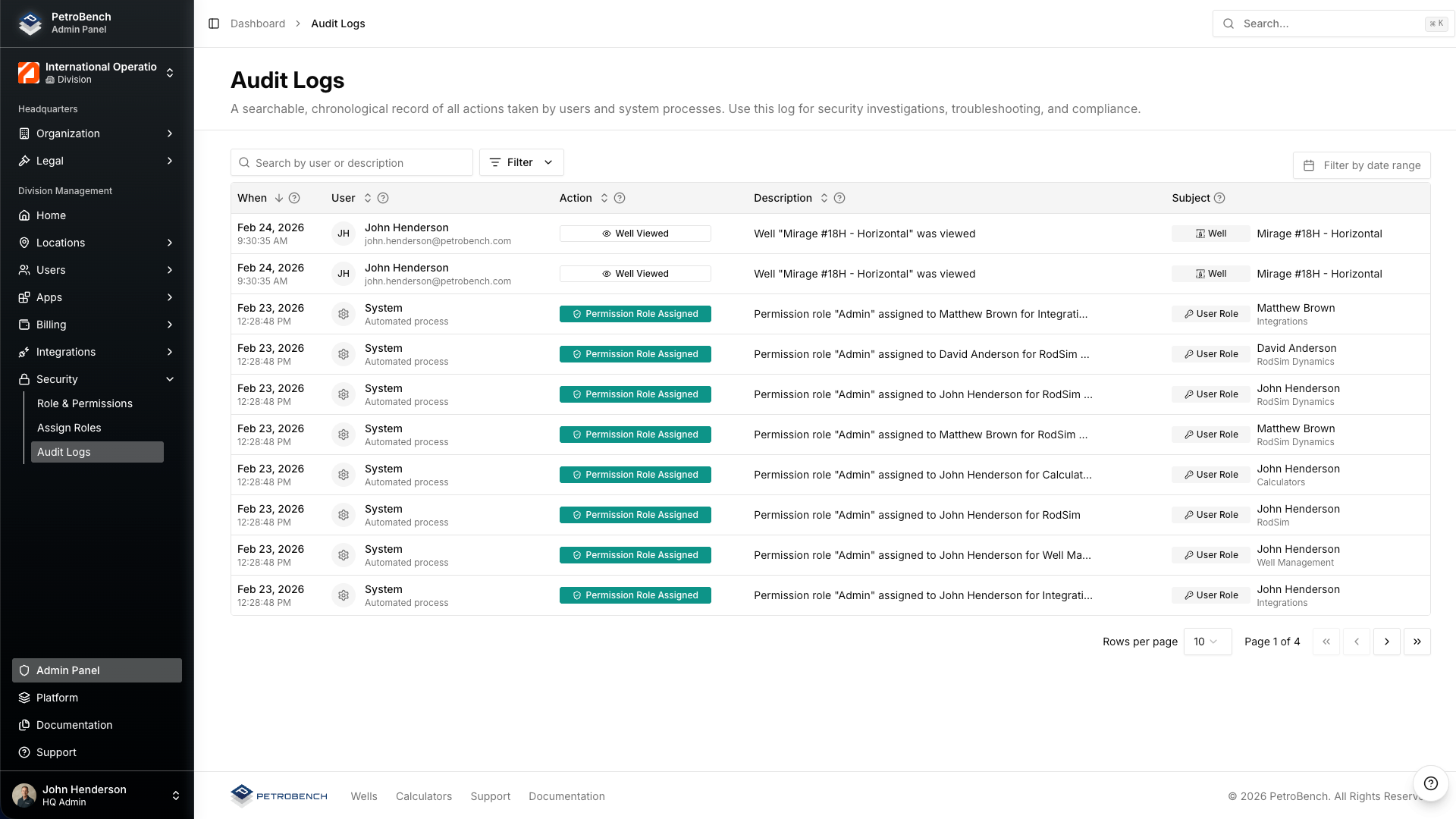
Every meaningful action in PetroBench is logged. The audit system captures who did what, when, and from where. Logs are immutable - users cannot edit or delete their own audit entries.
What gets logged
- User authentication events (login, logout, failed attempts)
- Simulation creation, modification, and deletion
- Well data imports and modifications
- Role assignments and permission changes
- Report generation and data exports
- Organization and division configuration changes
Version history on simulations
Beyond the audit log, every simulation maintains a full version history. When an engineer modifies input parameters and re-runs a simulation, the previous version is preserved. Admins and engineers can compare versions side-by-side and restore any prior state.
This is particularly relevant for regulatory compliance. If an auditor asks why a rod string design changed between two dates, you can pull up both versions with the exact inputs, outputs, and the user who made each change.
Data residency and security
PetroBench is a cloud-hosted platform. Here is what that means for your data:
- Encryption in transit - All traffic uses TLS 1.2+ between the browser and our API. No exceptions.
- Encryption at rest - All data is encrypted at rest using AES-256. This includes simulation data, well records, and uploaded files.
- Tenant isolation - Each organization's data is logically isolated. There is no shared data layer between tenants.
- No local data storage - The application runs entirely in the browser. No simulation data is cached on the user's machine. When the session ends, nothing remains locally.
For organizations with specific data residency requirements, contact our team to discuss regional hosting options.
Deployment model
PetroBench is browser-based. There is nothing to install on user machines, no desktop client to package and distribute, and no VPN tunnel to configure.
What this means for your IT team:
- No endpoint management - No installers, no version updates to push, no compatibility testing with your OS image.
- No VPN required - Access is over HTTPS. SSO handles authentication. Your firewall rules do not need to change.
- Browser support - Chrome, Edge, Firefox, and Safari. Any machine with a modern browser can run PetroBench at full capability, including 3D wellbore visualization and real-time simulation.
- Automatic updates - New features and patches deploy server-side. Users get the latest version on their next page load. No rollout schedules to coordinate.
For field engineers working on well sites with limited connectivity, PetroBench's lightweight architecture means the application loads and runs on standard mobile hotspot connections.
Evaluating PetroBench for your organization
If you are filling out a vendor security questionnaire or preparing an internal review, here is a summary of the key points:
- Authentication via SAML 2.0 SSO with your existing IdP
- Four fixed roles with clearly defined permission boundaries
- Organization/Division/Region hierarchy with server-side access scoping
- Immutable audit logs on all user actions
- Full version history on every simulation
- TLS 1.2+ in transit, AES-256 at rest, logical tenant isolation
- Browser-based delivery with zero endpoint footprint
Need more detail? We are happy to walk through a technical deep-dive with your security team. Reach out to schedule a call.